Home » MODDING HQ 1.13 » v1.13 Modding, Customising, Editing » v1.13 Modding, Customising, Editing » New weapons sprites (SOLVED) (Last questions for today, honest..)
| New weapons sprites (SOLVED)[message #365962]
|
Sun, 17 March 2024 22:16 
|
|
 Marcus Marcus |
 |
Messages:123
Registered:November 2014 |
|
|
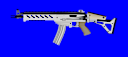
<a href="https://imgbb.com/"><img src="https://i.ibb.co/StMJ51K/test-Weapon.png" alt="test-Weapon" border="0"></a>
The original plan entailed substituting ALL weapons with a lower quantity of fancy military-grade only ones.
Prolly I devised a good pipeline: model and render in Blender, then vectorize with Inkscape. This would allow me to make a line of several weapons in a few hours, starting from a common base. Now:
A: I still have to optimize materials, lighting and a few details (picatinny rails, for example), still, would a similar quality be high enough?
B: The pic is 128 pixel wide: are weapons meant to be that exact width? What if I make two versions of the same weapon with different barrell length?
C: (Why I'm not allowed to upload pictures via the forum intrface?)
[Updated on: Mon, 18 March 2024 08:23] Report message to a moderator
|
Sergeant
|
|
|
|
| Re: New weapons sprites[message #365963 is a reply to message #365962]
|
Sun, 17 March 2024 23:41 
|
|
| Kitty |

 |
Messages:505
Registered:October 2017
Location: Germany |
|
|
If you zoom in into that example picture (real close), at the outlines of weapon, you'll see the blue turn into a violet
that will show ingame because the blue is the tranparancy colour and the pink won't turn transparent unlike the blue, leaving a visible outline that's not the weapon
picture size should be approximatly the same as others you see, in sti-editor you may have to adjust the offset coordinates to ensure it's matching where it shows
like big-pictures should fit in BR's inventory, medium should fit an inventory slot, small is not that important (that's for what's lying on the ground)
if you make a version with a different barrel, you would need to provide all nescessary pictures for that as well (big, md, sm)
since you're accustomed with blender, you may want to think about adding those weapons to Lobot as well (render, create sti, edit filters, etc)
(Lobot (LogicalBodytypes) is the feature that allows to show worn equipment, i.e. carry a backpack and show it, carry gun 1 and show gun1, carry gun2 and show gun2), etc)
Asdow posted a tutorial for that
Lobot Tutorial
[Updated on: Sun, 17 March 2024 23:48]
How to get: latest 1.13, 7609 and more | 7609 SCI (eng) | Compiling+SVN
I need more details. (Didi Hallervorden) Report message to a moderator
|
|
|
|
|
| Re: New weapons sprites[message #365964 is a reply to message #365963]
|
Mon, 18 March 2024 00:02
|
|
| Marcus |
|
Messages:123
Registered:November 2014 |
|
|
Hello there.
I don't know about LOBOT, and I mean: in 6 weeks I only made an half decent strategic map and some xml editing. I still have to make some 140 maps and a ton of xml editing. I'll consider this in a later stage.
In the meanwhile I modded the pic in Arulco Vacations and I did get the blue outline. I think it's probably due to wiz8 sti editor, I simply added the background in gimp. Also, I didn't know about centering the pic, of course. I'll try to load ja2 palette, it should be somewhere, iirc. Thanks again.
EDIT: I did some more testing, the outline is due to the fact that the sprite countour is not solid colours. I tried to sharpen the image in Gimp, but that changes colours. I hope I can fix that in inkscape, or my pipeline is done for good.
EDIT 2: It was a matter of anti-aliasing and I solved it. Still, can anybody explain how to center sprites in Wiz8 editor? Only material I found around is a 18 mins video without commentary and I could not even understand what they were doing.
EDIT 3: I found a tool that can set coordinates (STI-Edit), in the tools thread at the top of this subforum.
[Updated on: Mon, 18 March 2024 08:25] Report message to a moderator
|
Sergeant
|
|
|
|
Goto Forum:
Current Time: Fri Jun 12 02:22:52 GMT+3 2026
Total time taken to generate the page: 0.00568 seconds
|

 Blog
Blog Search
 Help
Help Members
 Register
 Login
Login Home
Home